
Activity Life Cycle
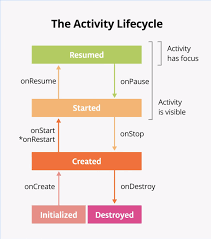
- An activity is a basic building block of Android which represent the single user screen.
- Through the activity lifecycle different states are managed.
- The methods of activity lifecycle are automatically called at different points.
- Through these method, specific actions are performed according to the current state.
Activity Life Cycle Method
onCreate()
Its main work is to initialize the Activity’s UI, such as inflating the layout (loading the XML layout on the screen) and connecting the views (like Button, TextView, EditText) using findViewById().
@Override
protected void onCreate(Bundle savedInstanceState) {
super.onCreate(savedInstanceState);
setContentView(R.layout.activity_main);
Log.d(“Lifecycle”, “onCreate”);
}
onStart()
This method is called when the activity becomes visible to the user.
At this stage, the activity starts appearing on the screen.
It is a good place to start animations and apply other visual changes.
@Override
protected void onStart() {
super.onStart();
Log.d(“Lifecycle”, “onStart”);
}
onResume()
This method is called when the activity comes to the foreground.
In this state, the user can interact with the activity.
   @Override
protected void onResume() {
super.onResume();
 Log.d("Lifecycle", "onResume");
              }
onPause()
This method is called when the activity is no longer in the foreground (that is, the user is not actively interacting with the activity).
It is a good place to pause ongoing tasks.
@Override
protected void onPause() {
super.onPause();
Log.d(“Lifecycle”, “onPause”);
}
onStop()
This method is called when the activity is no longer visible to the user.
At this stage, the activity becomes hidden from the screen.
It is a good place to stop animations and other visual updates.
@Override
protected void onStop() {
super.onStop();
Log.d(“Lifecycle”, “onStop”);
}
onDestroy()
This method is called when the activity is about to be destroyed.
It is a good place to release resources and clean up any remaining data
@Override
protected void onDestroy() {
super.onDestroy();
Log.d(“Lifecycle”, “onDestroy”);
}
Understanding the Lifecycle Flow —
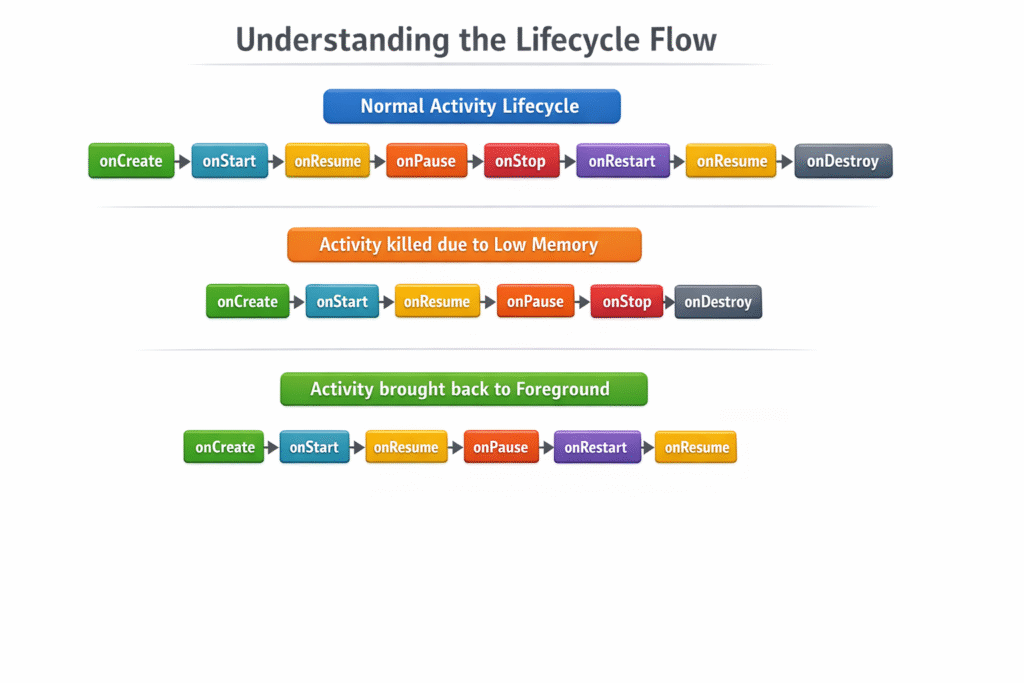
Normal Activity Lifecycle —
onCreate → onStart → onResume → onPause → onStop → onRestart → onStart → onResume → onPause → onStop → onDestroy
Activity killed due to low memory —
onCreate → onStart → onResume → onPause → onStop → onDestroy
Activity brought back to foreground —
onCreate → onStart → onResume → onPause → onStop → onRestart → onStart → onResume