
What is a Service in Android?
A Service is an application component that can perform long-running operations in the background. A service does not provide a user interface.
Services do their work even user is not on the application. So services are used for such task which requires continuous processing.
Key Point: A Service is NOT a separate process or thread. You must manually create a background thread (e.g., using Thread, AsyncTask, Coroutines, or ExecutorService) inside a Service if you want truly background execution.
Started Service (Unbound)
A Started Service is a service that is launched by an Activity by calling the startService(Intent) method.
Once service started, it runs indefinitely in the background — it is completely independent of the component that started it.
Bound Service
A Bound Service is a service that allows application components (like Activities, Fragments, or even other Services) to interact with it.
Foreground Service
A Foreground Service is a type of service that performs operations that are visible to the user.
It must display a persistent notification in the status bar while it is running. This notification is the proof to the user that something important is happening in the background.
Note: A service can be both started AND bound at the same time. In that case, the service runs until it is explicitly stopped AND all clients are unbound.
Service Lifecylce
The lifecycle of a service is simpler than the Activity lifecycle. However, it’s even more important that you pay close attention to how your service is created and destroyed. Because a service has no UI, services can continue to run in the background with no way for the user to know, even if the user switches to another app. This situation can potentially consume resources and drain the device battery.
Similar to an Activity, a service has lifecycle callback methods that you can implement to monitor changes in the service’s state and perform work at the appropriate times.
Started Service Lifecycle
When you call startService(Intent), Android creates the service (if not already running) and calls the lifecycle methods in a specific order. Here is the complete lifecycle:
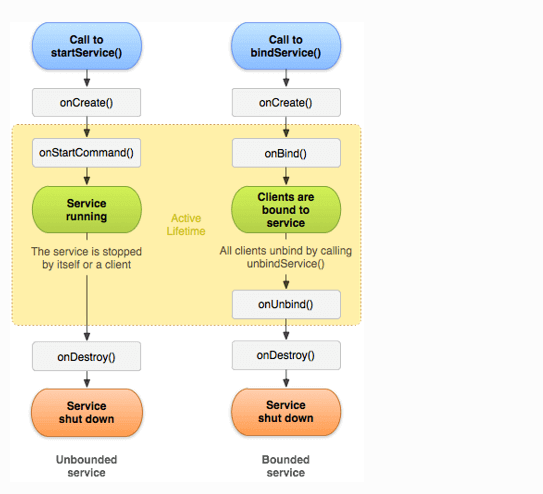
Bound Service Lifecycle
A Bound Service allows other components (like an Activity) to bind to it, send requests, receive responses, and even perform inter-process communication (IPC). The service is active only while at least one component is bound to it.
Key Lifecycle Methods Explained
onCreate()
Called when the service is first created. Use this to set up one-time initialization — like creating a thread or setting up an IPC mechanism. This is called only once during the lifetime of the service.
onStartCommand(Intent, int, int)
Called every time a client starts the service using startService(). This is where your actual work begins. The three parameters are: the Intent passed, a flag (e.g., START_FLAG_REDELIVERY), and the unique start ID.
onBind(Intent)
Called when a component calls bindService(). Must return an IBinder object that clients use to communicate with the service. If binding is not supported, return null.
onUnbind(Intent)
Called when all clients have disconnected. Return true if you want onRebind() to be called when new clients connect in the future.
onRebind(Intent)
Called if onUnbind() returned true and a new client binds to the service.
onDestroy()
Called when the service is no longer used and is being destroyed. Always clean up resources here — stop threads, unregister receivers, close connections.
Code Examples
Creating a Started Service (Java)
public class MyService extends Service {

    @Override
    public void onCreate() {
        super.onCreate();
        // One-time initialization
    }

    @Override
    public int onStartCommand(Intent intent, int flags, int startId) {
        // Do background work here
        new Thread(new Runnable() {
            @Override
            public void run() {
                // Long running task (e.g., download file)
                stopSelf(); // stop when done
            }
        }).start();
        return START_STICKY;
    }

    @Override
    public IBinder onBind(Intent intent) {
        return null; // not a bound service
    }

    @Override
    public void onDestroy() {
        super.onDestroy();
        // Cleanup resources
    }
}
Registering Service in AndroidManifest.xml
<service
    android:name=".MyService"
    android:enabled="true"
    android:exported="false" />
Starting and Stopping a Service
// Start service
Intent intent = new Intent(this, MyService.class);
startService(intent);

// Stop service from Activity
stopService(intent);
Common Exam & Interview Questions
onDestroy() may not be called.<service> tag. Without this declaration, the service will not be found and will throw an exception.onBind() and the client uses it to interact with the service directly.